Insights API Map
From consumer to origin, layer by layer. The path of every call, built from real traffic.
The map, in action
From consumer to origin, layer by layer.
The path of every call
Each layer is a card. Click any one to see what it is and what it's connected to.
-
01
Consumer
Who calls the API, by country and by network.
-
02
Workload
The edge application that receives the call.
-
03
Firewall
The firewall the call goes through.
-
04
API
The API host, with endpoints, requests and state.
-
05
Resources
The resources and operations inside the API.
One API, seen as a whole
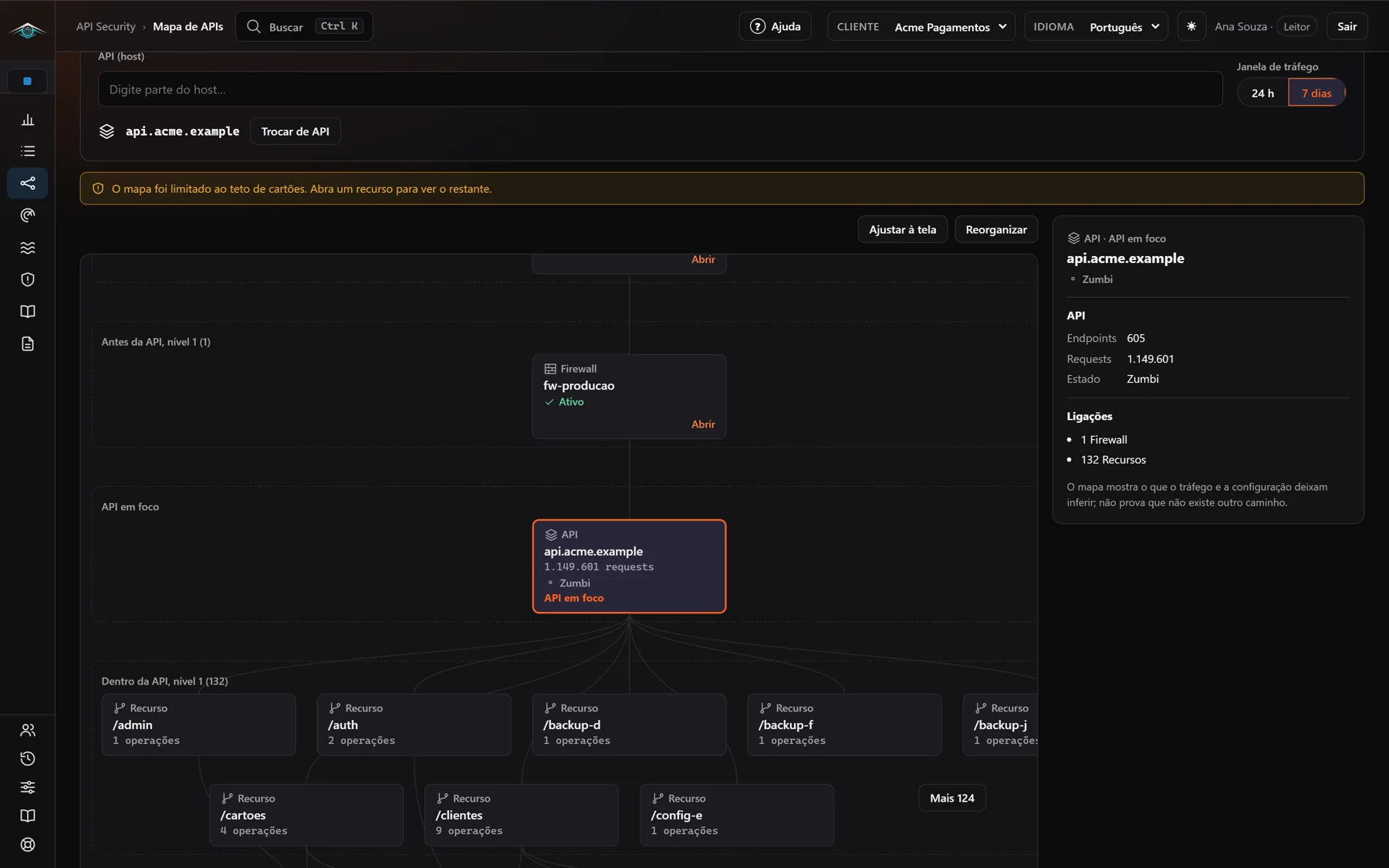
What comes before and what's inside
Firewall and consumers above, resources and operations below, in levels.
Endpoints, requests and state
The panel shows how many endpoints the API has, the request volume and whether it is legitimate, shadow or zombie.
24-hour or 7-day window
Switch the traffic window without leaving the map.
Fit to screen and rearrange
Cards you can drag and a layout that rebuilds itself when needed.
Click a card and the path lights up
When you select a consumer, a workload or a firewall, the map highlights the path to the API and the side panel shows its details and connections.
From there, the “Open in Insights” button takes you to the matching item.
The map says what it knows, and what it doesn't
The API Map shows what traffic and configuration let you infer. It does not prove that there is no other path to the API.
When an API has more resources than fit on screen, the map warns that it limited the cards and lets you open each resource to see the rest.
From the map to the next step
API Security
The API inventory with the risk of each one and the documentation generated from traffic.
WAF and Edge Management
WAF and edge rules, and how they relate to each other.
Defense Center
Defense now and maturity per endpoint, to act on what the map showed.
Risk Scenario in Brazil
in Brazil in 2026, up 3.5% from the previous year. Visibility and fast response reduce the impact before the incident spreads.
started with a supply chain compromise, tied with phishing as the most common entry point. Knowing which third-party APIs and integrations are exposed is the first step to reducing this risk.
Questions about the API Map
Where does the map data come from?
From the real traffic that goes through your edge and from its configuration. You choose the window: 24 hours or 7 days.
Does the map prove there is no other path to the API?
No. It shows what traffic and configuration let you infer. The panel itself carries this notice.
What if the API has hundreds of resources?
The map limits the number of cards and warns you. Open a resource to see the rest.
What is the difference from WAF and Edge Management?
The API Map shows who calls each API and where the call goes through. WAF and edge rules, and the relationship between them, live in WAF and Edge Management.
See your APIs map
Tell us your scenario. Our team gets back to you through the channel you prefer.
Talk to a specialist →